
diff options
Diffstat (limited to 'README.md')
| -rw-r--r-- | README.md | 209 |
1 files changed, 155 insertions, 54 deletions
@@ -1,7 +1,8 @@ # paper2remarkable -[](https://pypi.org/project/paper2remarkable) +[](https://pypi.org/project/paper2remarkable) +[](https://travis-ci.org/GjjvdBurg/paper2remarkable) +[](https://pepy.tech/project/paper2remarkable/month) ``paper2remarkable`` is a command line program for quickly and easily transferring an academic paper to your [reMarkable](https://remarkable.com/): @@ -10,8 +11,20 @@ transferring an academic paper to your [reMarkable](https://remarkable.com/): $ p2r https://arxiv.org/abs/1811.11242 ``` -The script can be run through the ``p2r`` command line program or via Docker -(see below). +There is also support for transferring an article from a website: + +``` +$ p2r https://hbr.org/2019/11/getting-your-team-to-do-more-than-meet-deadlines +``` + +The script can be run through the ``p2r`` command line program or via Docker +(see below). If you're using MacOS, you might be interested in the [Alfred +workflow](#alfred-workflow) or [Printing to p2r](#printing). On Linux, a +background terminal such as [Guake](http://guake-project.org/) can be very +handy. Note that even without a reMarkable, this program can make downloading +papers easier (just use the `-n` flag). + +## Introduction ``paper2remarkable`` makes it as easy as possible to get a PDF on your reMarkable from any of the following sources: @@ -19,22 +32,28 @@ reMarkable from any of the following sources: * [arXiv](https://arxiv.org/) * [ACM Digital Library](https://dl.acm.org/dl.cfm) * [CiteSeerX](http://citeseerx.ist.psu.edu/index) +* [CVF](https://openaccess.thecvf.com/menu) +* [JMLR](http://jmlr.org) +* [NBER](https://www.nber.org) * [NeurIPS](https://papers.nips.cc/) * [OpenReview](https://openreview.net/) * [PMLR](http://proceedings.mlr.press/) * [PubMed Central](https://www.ncbi.nlm.nih.gov/pmc/) +* [SagePub](https://journals.sagepub.com/) +* [SemanticScholar](https://www.semanticscholar.org/) * [SpringerLink](https://link.springer.com/) * A generic URL to a PDF file * A local PDF file +* Any article on a website The program aims to be flexible to the exact source URL, so for many of the -sources you can either provide a URL to the abstract page or to the PDF file. -If you have an source that you would like to see added to the list, let me -know! +academic sources you can either provide a URL to the abstract page or to the +PDF file. If you have a source that you would like to see added to the list, +let me know! ``paper2remarkable`` takes the source URL and: -1. Downloads the pdf if necessary +1. Downloads the pdf 2. Removes the arXiv timestamp (for arXiv sources) 3. Crops the pdf to remove unnecessary borders 4. Shrinks the pdf file to reduce the filesize @@ -47,43 +66,13 @@ Optionally, you can: - Download a paper but not upload to the reMarkable using the ``-n`` switch. - Insert a blank page after each page using the ``-b`` switch (useful for note taking!) -- Center the pdf on the reMarkable (default is left-aligned) +- Center (``-c``) or right-align (``-r``) the pdf on the reMarkable (default + is left-aligned), or disable cropping altogether (``-k``). - Provide an explicit filename using the ``--filename`` parameter - Specify the location on the reMarkable to place the file (default ``/``) -Here's the full help of the script: - -```text -usage: p2r [-h] [-b] [-c] [-d] [-n] [-p REMARKABLE_DIR] [-v] - [--filename FILENAME] [--gs GS] [--pdfcrop PDFCROP] [--pdftk PDFTK] - [--rmapi RMAPI] - input - -Paper2reMarkable version 0.4.0 - -positional arguments: - input URL to a paper or the path of a local PDF file - -optional arguments: - -h, --help show this help message and exit - -b, --blank Add a blank page after every page of the PDF - -c, --center Center the PDF on the page, instead of left align - -d, --debug debug mode, doesn't upload to reMarkable - -n, --no-upload don't upload to the reMarkable, save the output in - current working dir - -p REMARKABLE_DIR, --remarkable-path REMARKABLE_DIR - directory on reMarkable to put the file (created if - missing, default: /) - -v, --verbose be verbose - --filename FILENAME Filename to use for the file on reMarkable - --gs GS path to gs executable (default: gs) - --pdfcrop PDFCROP path to pdfcrop executable (default: pdfcrop) - --pdftk PDFTK path to pdftk executable (default: pdftk) - --rmapi RMAPI path to rmapi executable (default: rmapi) -``` - -And here's an example with verbose mode enabled that shows everything the -script does by default: +Here's an example with verbose mode enabled that shows everything the script +does by default: ``` $ p2r -v https://arxiv.org/abs/1811.11242 @@ -105,26 +94,129 @@ $ p2r -v https://arxiv.org/abs/1811.11242 The script requires the following external programs to be available: -- [pdftk](https://www.pdflabs.com/tools/pdftk-the-pdf-toolkit/) -- [pdfcrop](https://ctan.org/pkg/pdfcrop?lang=en): usually included with a - LaTeX installation. +- [pdftk](https://www.pdflabs.com/tools/pdftk-the-pdf-toolkit/), + [qpdf](http://qpdf.sourceforge.net/), or + [pdftk-java](https://gitlab.com/pdftk-java/pdftk), whichever your package + manager provides. - [GhostScript](https://www.ghostscript.com/) - [rMAPI](https://github.com/juruen/rmapi) -If these scripts are not available on the ``PATH`` variable, you can supply -them with the relevant options to the script. Then, you can install -``paper2remarkable`` from PyPI: +Specifically: + +1. First install [rMAPI](https://github.com/juruen/rmapi), using + ``` + $ go get -u github.com/juruen/rmapi + ``` + +2. Then install system dependencies: + - **Arch Linux:** ``pacman -S pdftk ghostscript poppler`` + - **Ubuntu:** ``apt-get install pdftk ghostscript poppler-utils``. Replace + ``pdftk`` with ``qpdf`` if your distribution doesn't package ``pdftk``. + - **MacOS:** ``brew install pdftk-java ghostscript poppler`` (using [HomeBrew](https://brew.sh/)). + - **Windows:** Installers or executables are available for + [qpdf](https://github.com/qpdf/qpdf/releases) (for instance the mingw + binary executables) and + [GhostScript](https://www.ghostscript.com/download/gsdnld.html). + Importantly, Windows support is untested and these are generic + instructions, so we welcome clarifications where needed. The Docker + instructions below may be more convenient on Windows. + +3. Finally, install ``paper2remarkable``: + ``` + $ pip install paper2remarkable + ``` + this installs the ``p2r`` command line program. + +**Optionally**, you can install: + +- [pdftoppm](https://linux.die.net/man/1/pdftoppm) (recommended for speed). + Usually part of a [Poppler](https://poppler.freedesktop.org/) installation. + +- the [ReadabiliPy](https://github.com/alan-turing-institute/ReadabiliPy) + package with Node.js support, to allow using + [Readability.js](https://github.com/mozilla/readability) for HTML articles. + This is known to improve the output of certain web articles. + +If any of the dependencies (such as rmapi or ghostscript) are not available on +the ``PATH`` variable, you can supply them with the relevant options to the +script (for instance ``p2r --rmapi /path/to/rmapi``). If you run into trouble +with the installation, please let me know by opening an issue [on +Github][github-url]. + +## Usage + +The full help of the script is as follows. Hopefully the various command line +flags are self-explanatory, but if you'd like more information, please open an +issue [on GitHub][github-url]. + +``` +usage: p2r [-h] [-b] [-c] [-d] [-n] [-p REMARKABLE_DIR] [-r] [-k] [-v] [-V] + [--filename FILENAME] [--gs GS] [--pdftoppm PDFTOPPM] [--pdftk PDFTK] + [--qpdf QPDF] [--rmapi RMAPI] + input [input ...] + +Paper2reMarkable version 0.7.3 +positional arguments: + input One or more URLs to a paper or paths to local PDF files + +optional arguments: + -h, --help show this help message and exit + -b, --blank Add a blank page after every page of the PDF + -c, --center Center the PDF on the page, instead of left align + -d, --debug debug mode, doesn't upload to reMarkable + -n, --no-upload don't upload to the reMarkable, save the output in current working dir + -p REMARKABLE_DIR, --remarkable-path REMARKABLE_DIR + directory on reMarkable to put the file (created if missing, default: /) + -r, --right Right align so the menu doesn't cover it + -k, --no-crop Don't crop the pdf file + -v, --verbose be verbose + -V, --version Show version and exit + --filename FILENAME Filename to use for the file on reMarkable + --gs GS path to gs executable (default: gs) + --pdftoppm PDFTOPPM path to pdftoppm executable (default: pdftoppm) + --pdftk PDFTK path to pdftk executable (default: pdftk) + --qpdf QPDF path to qpdf executable (default: qpdf) + --rmapi RMAPI path to rmapi executable (default: rmapi) ``` -pip install paper2remarkable + +## Alfred Workflow + +On MacOS, you can optionally install [this Alfred workflow][workflow]. Alfred +is [a launcher for MacOS](https://www.alfredapp.com/). + +Once installed, you can then use `rm` command and `rmb` (for the `--blank` +pages to insert blank pages between pages for notes) with a URL passed. The +global shortcut `Alt-P` will send the current selection to `p2r`. Note that by +default `--right` is passed and `p2r` is executed in your `bash` environment. +You can edit the Workflow in Alfred if this doesn't work for your setup. + +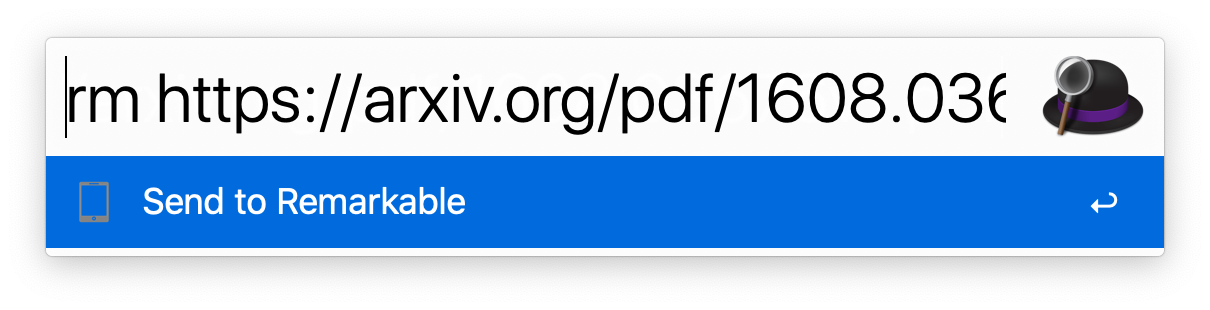 + +[workflow]: https://github.com/GjjvdBurg/paper2remarkable/blob/master/Remarkable.alfredworkflow?raw=true + +## Printing + +Printing to `p2r` allows printing prompts to save directly to your reMarkable +tablet, passing through `p2r` for processing. + +For MacOS, you can follow [the guide][print-guide] for printing with `rmapi`, +but for the bash script, instead use this script: + +``` +for f in "$@" +do + bash -c -l "p2r --right '$f'" +done ``` -This installs the ``p2r`` command line program. +[print-guide]: https://github.com/juruen/rmapi/blob/master/docs/tutorial-print-macosx.md ## Docker -You can also use our Dockerfile to avoid installing dependencies on your -machine. You will need `git` and `docker` installed. +If you'd like to avoid installing the dependencies directly on your machine, +you can use the Dockerfile. To make this work you will need ``git`` and +``docker`` installed. First clone this repository with `git clone` and `cd` inside of it, then build the container: @@ -161,8 +253,15 @@ docker run --rm -v "${HOME}/.rmapi:/home/user/.rmapi:rw" p2r --help # equivalent to above usage docker run --rm -v "${HOME}/.rmapi:/home/user/.rmapi:rw" p2r -v https://arxiv.org/abs/1811.11242 + +# to transfer a local file in the current directory +docker run --rm -v "${HOME}/.rmapi:/home/user/.rmapi:rw" -v "$(pwd):/home/user:r" p2r -v localfile.pdf ``` +For transferring local files using the Docker image, you may find [this helper +function](https://github.com/GjjvdBurg/paper2remarkable/issues/34#issuecomment-610852258) +useful. + You can also create an [alias](http://tldp.org/LDP/abs/html/aliases.html) in your ``~/.bashrc`` file to abstract away the Docker commands: @@ -178,5 +277,7 @@ Then you can use ``paper2remarkable`` from the command line as ``p2r``! License: MIT -If you find a problem or want to suggest a feature, please let us know! You're -helping to make this project better! +If you find a problem or want to suggest a feature, please open an issue [on +Github][github-url]. You're helping to make this project better for everyone! + +[github-url]: https://github.com/GjjvdBurg/paper2remarkable |